Block Timing Net Read Snapshot
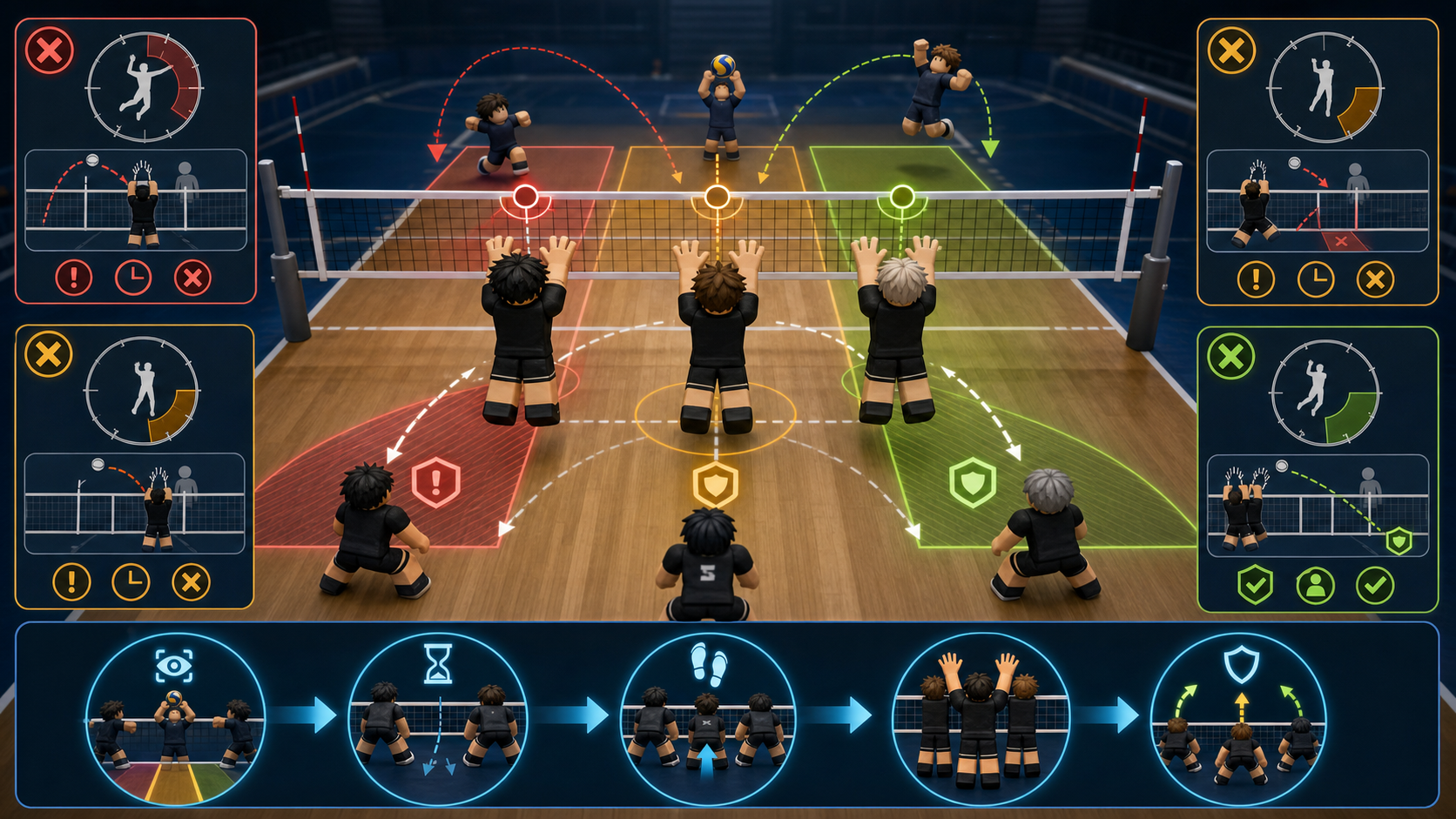
This June 3 block timing note is a hands-on note for keeping the net-defense page practical. Use it as a self-review board after a missed block: read the set first, hold jump second, seal one lane third, and call cover last.
| Check | What to review | First fix |
|---|---|---|
| early-jump check | The blocker jumps before the hitter commits or before the set path is clear. | Wait one beat after the hitter rises, then press the block input at useful net height. |
| late-net check | The blocker is still moving into position when the attack already starts. | Start closer to the net and arrive before reading the swing lane. |
| wrong-lane check | The block slides across straight, angle, and middle with no readable lane call. | Pick one lane to remove and let the backcourt cover around that choice. |
| no-cover check | A touch, tip, or deflection falls behind the wall because no teammate shaded cover. | Call cover before jumping and leave late blocks for a receiver instead of opening court. |
Official Block Baseline
The official Volleyball Legends Roblox description lists Set / Block in midair on Q for PC and LT for console. Fandom's control table cross-checks the same action label. This page does not connect to Roblox, read accounts, automate jumps, or claim hidden block timing data.
Blocking is a net decision before it is an input. A useful block arrives before the hit, chooses one lane, and lets teammates cover tips or deflections.
Block Timing Matrix
Use this matrix before changing styles. Many block mistakes come from timing and positioning, not a missing Secret style.
| Miss pattern | First fix | Why it matters |
|---|---|---|
| Jumping before the set is clear | Wait for the hitter to commit | Early blocks lose height before the spike reaches the net. |
| Arriving after a fast set | Start closer to the net | The block input cannot fix a late starting position. |
| Camping the net every rally | Read setter direction first | Blind net camping opens tips, short balls, and backcourt confusion. |
| No one covers deflections | Call cover before jumping | A touch on the block still needs a receiver behind it. |
Lane Decision Table
Do not try to block the whole court alone. Pick the lane you are removing, then let teammates cover around the wall.
| Lane call | Best use | Teammate cover |
|---|---|---|
| Straight | Hitter keeps aiming down the obvious line. | Backcourt shades angle and short tip. |
| Angle | Hitter beats straight blocks with side aim. | Backcourt protects line and deep middle. |
| Middle | Setter sends fast balls through center traffic. | Teammates cover both sidelines after the touch. |
| Leave / Cover | You are late, low, or out of net position. | Receive instead of turning a late jump into an open court. |
Practice Route After A Stable Block
After block timing is stable, move through the rest of the mechanics cluster instead of returning to search. Use the controls guide for input checks, how to spike to understand hitter timing, how to receive for cover after deflections, the serve practice timer for short warmups, role picker for blocker discipline, styles tier list, abilities tier list, ability comparison, combo builder, and the ranked guide when you can call one lane reliably.
This page is not an official block simulator. It avoids one-button block promises, automated jump advice, and fake reaction scores so the guide remains useful for normal Roblox play and advertising review.
Editorial Status
This page is maintained as an independent Volleyball Legends guide. Review notes are visible so players and search engines can separate checked guidance from official game updates.
Route Chain
Follow one same-category page or one cross-category side jump before returning to search. Each link has a reason so the path stays useful instead of becoming a generic related-post block.
Fast Answer
To block in Volleyball Legends, jump near the net and use the midair Set / Block action: Q on PC or LT on console. The practical beginner rule is to arrive before the hitter swings, jump after the hitter commits, and choose one lane for teammates to cover around.
Official Block Baseline
The official Roblox game description lists Set / Block in Midair on Q for PC and LT for console. Fandom's controls table cross-checks the same action label, while Pro Game Guides treats block as one of the harder moves to master because timing matters. This page uses those public inputs as the fact baseline and keeps practice advice separate from official claims.
Block Search Route
Block Search Route turns common net-defense searches into one safe next step. Use the row that matches the visible miss, then stop when the route proves whether the issue is arrival timing, hitter read, lane call, teammate cover, ranked role order, or blocker build fit.
| Search phrase | Likely problem | Open first | Stop condition |
|---|---|---|---|
| how to block in Volleyball Legends | The player needs the public midair Q or LT input plus a one-lane rule. | controls guide, practice drills, role picker | Stop judging blocker styles until arrival, jump timing, and one lane call are repeatable. |
| Volleyball Legends block early jump | The blocker jumps before the set path and hitter commitment are readable. | spike guide, set guide, serve timer | Stop pressing block before the hitter has committed to a swing lane. |
| block wrong lane | The blocker slides between straight, angle, and middle with no call. | team rotation, best team comps, receive guide | Stop trying to cover the whole court alone; remove one lane and let cover handle the rest. |
| ranked block chaos | Nobody owns net pressure, deflection cover, or late-block leave calls under ranked pace. | ranked guide, team rotation, best team comps | Stop queueing if block, receive cover, second touch, and attack lanes are not assigned. |
| post-code blocker build | Fresh code rewards made the player consider Steel Block, Boom Jump, Lead Feet, or a blocker style before match evidence. | spin value, Steel Block, Boom Jump | Stop spending if the same block problem has not repeated across three readable matches. |
Block Timing Ladder
Block Timing Ladder is the safe order for fixing net defense. Do not skip to blocker ability rerolls if a lower rung is failing, because a stronger kit cannot replace late arrival, early jump timing, or missing cover calls.
| Rung | Pass signal | If it fails | Route |
|---|---|---|---|
| Arrive before jump | You reach blocking position before the hitter starts the attack, not while the swing is already happening. | Start closer, move sooner, or leave the ball for receive cover. | practice drills, mobile controls |
| Read hitter commitment | You jump after the set and hitter path reveal a likely swing lane. | Study hitter timing instead of mashing block. | spike guide, set guide |
| Seal one lane | The block removes straight, angle, or middle instead of drifting across all three. | Call one lane and let teammates cover around it. | team rotation, receive guide |
| Ranked block test | Three matches show whether lane calls and cover survive ranked speed. | Review ranked route and ability fit before spending. | ranked guide, ability comparison |
Why Blocks Miss
Most missed blocks come from early jumps, late net positioning, or trying to cover every lane. A block can still be useful if it removes one predictable hit and lets teammates cover the rest. It becomes harmful when it opens the court, steals cover, or turns every rally into a style blame loop.
Lane Rule
Before jumping, decide whether you are taking straight, angle, or middle. If you change the lane every rally with no call, backcourt players cannot read around the block. Start with one lane, review the hitter's response, then adjust.
Block Lane Decision
Block Lane Decision keeps the net player useful without pretending one block covers the whole court. Choose the job before jumping: straight lane, angle lane, middle press, or drop and cover.
| Lane choice | Use when | Main risk | Support route |
|---|---|---|---|
| straight lane | The hitter keeps driving down the line or your team wants to remove the obvious route. | Angle and short tips stay open if backcourt does not shade cover. | receive guide |
| angle lane | The hitter beats straight blocks with side aim or cross-court pressure. | The line stays available if the receiver does not cover deep. | team rotation |
| middle press | Fast sets, quick attacks, or center traffic are the repeated problem. | Both sidelines open if the block chases late. | set guide |
| drop and cover | You are late, too low, or out of position for a useful wall. | Jumping anyway opens the court and removes one receiver. | best team comps |
When To Check Styles And Abilities
After block timing and lane calls feel repeatable, compare kit support with styles, abilities, style comparison, ability comparison, combo builder, Steel Block, Boom Jump, and Lead Feet. Do not treat a bad jump rhythm as proof that your account needs a reroll.
After Three Missed Blocks
After Three Missed Blocks, stop and label the repeated net-defense problem. The fix should happen before another ranked queue, before spending code rewards, and before copying a blocker build claim from a clip.
| Review label | Use when | Do next | Open first |
|---|---|---|---|
| Stop jumping early | The block is already falling before the hitter contacts the ball. | Wait for the set path and hitter commitment before pressing Q or LT. | spike guide, practice drills |
| Fix lane call | You touch no balls because the wall chases straight, angle, and middle at once. | Pick one lane and assign backcourt cover before the next ranked block. | team rotation, ranked guide |
| Review blocker build | Timing and lane calls are stable but the account needs better net denial, emergency height, or movement limits. | Compare blocker abilities and style routes, then check spin risk before spending. | Steel Block, Boom Jump, pity tracker |
| Source check blocker claim | A Discord, TikTok, YouTube, or comment claim says one block build is suddenly mandatory. | Keep creator clips separate from dated source claims and your own three-match evidence. | source policy, spin value |
FAQ
Why do I keep missing blocks in Volleyball Legends?
Common causes are jumping too early, arriving at the net late, choosing a random lane, or blocking without teammate cover. Fix timing and lane calls before rerolling.
Should I block every spike?
No. Block when you can arrive at the net before the hitter swings and can take away one useful lane. Stay back or cover when your position is late.
Does this block helper know my real timing?
No. It is not an official block simulator and does not connect to Roblox. It only turns public controls and self-reported block problems into a practice route.
Should I chase Steel Block if my blocks miss?
Only after arrival timing, hitter read, and one-lane calls are repeatable. Steel Block can support a blocker route, but it cannot replace correct net timing or teammate cover.
What should I do after redeeming codes if I want a blocker build?
Separate style and ability rewards, then compare Steel Block, Boom Jump, Lead Feet, style fit, and pity risk before spending. If the repeated miss is early jump or wrong lane, practice first.
Sources And Verification
Use official sources first, then public code checks as supporting evidence. This site is independent and is not affiliated with Roblox or Volleyball Game Group.
- Official Roblox game page
- Official Discord discovery page
- Beebom code check
- GamesRadar code check
- Pro Game Guides code check
- Fandom codes reference
- Fandom Yen reference
- MrGuider code and update log
- MrGuider Update 74 recap
- Destructoid code check
- U7BUY code check
- Bloxodes code check
- Fandom styles reference
- Fandom Kumo reference
- Fandom Sanju reference
- Fandom Feiko reference
- Fandom Taichou reference
- Fandom Kijo reference
- Fandom positions and playstyles reference
- Fandom abilities reference
- Fandom Magnetic Pull reference
- Pro Game Guides Magnetic Pull guide
- Fandom pity reference
- Fandom controls reference
- Pro Game Guides beginner mechanics reference
- Pro Game Guides ability tier reference
- Pro Game Guides Feiko reference
- Pro Game Guides Kijo reference
Was this page helpful?
Quick feedback helps prioritize which Volleyball Legends pages need deeper testing, screenshots, or tool upgrades next.
No vote saved yet.
Source check
Spot outdated game data?
Send a short note or image. This page title and URL are attached automatically for review.