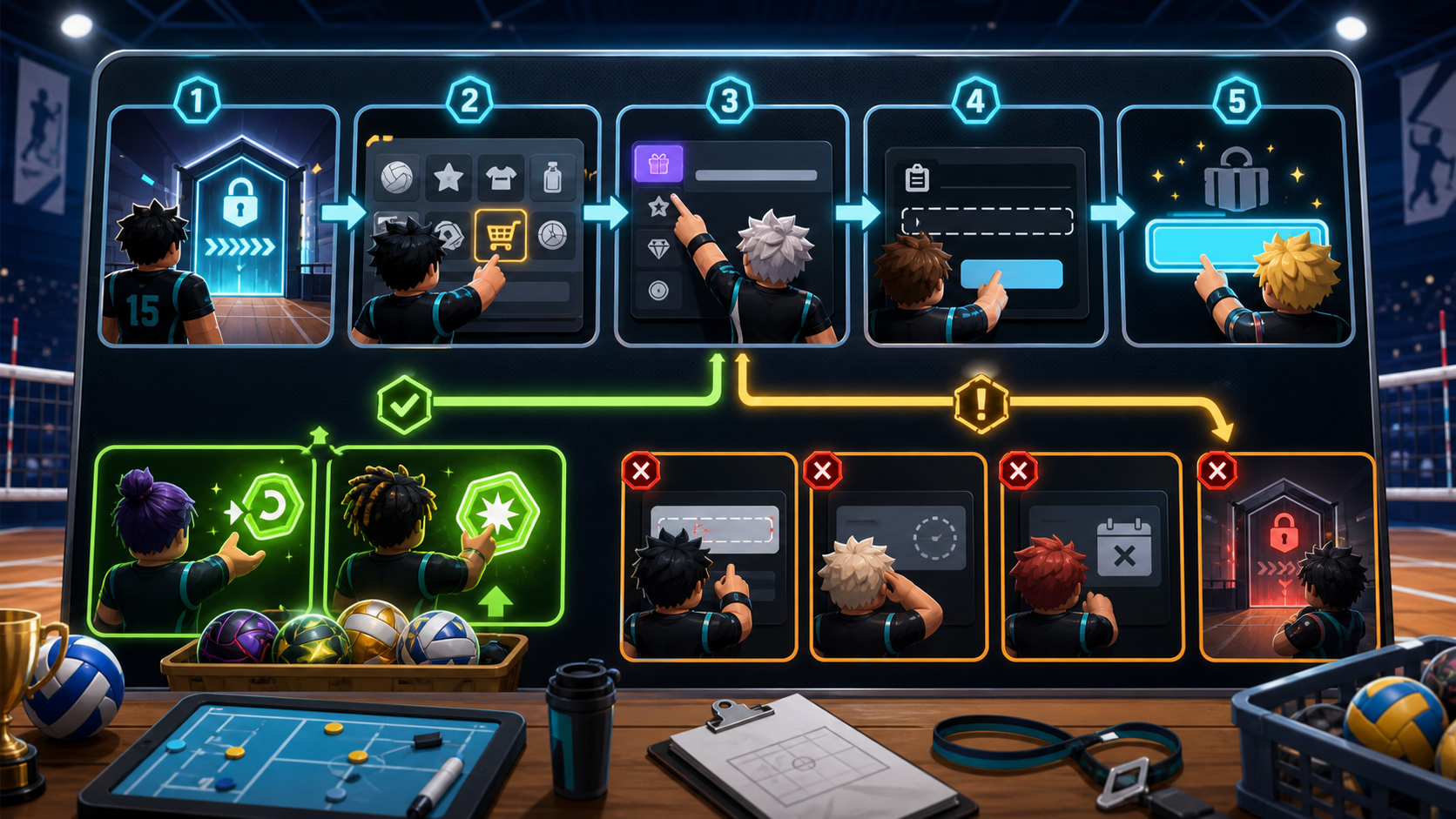
Redeem Source Snapshot
This June 3 redeem source snapshot keeps the walkthrough focused on the checks public code references consistently repeat: account level, exact menu path, exact code copying, one-use rewards, and update expiry. It does not connect to Roblox and cannot confirm a live redemption on your account.
| Check | What the player verifies | Safe publishing action |
|---|---|---|
| Level 15 warning check | The account should reach Level 15 before the code box or Use Code action is treated as reliable. | Send new players to the Level 15 planner instead of marking a current code dead. |
| Shop icon check | The redemption path starts from the Shop menu after launching Volleyball Legends from Roblox. | Keep the guide as a menu walkthrough, not an auto-redeem promise. |
| Codes tab check | The player should choose the Codes tab, paste exact capitalization, and remove leading or trailing spaces. | Route typo failures back to the working code table before changing code status. |
| Use Code button check | If Use Code accepts input, the reward may be a Lucky Style Spin, Lucky Ability Spin, or another listed reward. | Send successful redemptions into reward aftercare instead of encouraging blind rerolls. |
Codes To Try After The Steps
| Code | Reward | Status | Action |
|---|---|---|---|
UPDATE_80 |
5 Lucky Style Spins | Update 80 public-source agreement checked August 7 | |
HIDARI_FINALLY |
5 Lucky Style Spins | Update 80 public-source agreement checked August 7 | |
ENCHO_NERF |
5 Lucky Ability Spins | Update 80 public-source agreement checked August 7 |
Editorial Status
This page is maintained as an independent Volleyball Legends guide. Review notes are visible so players and search engines can separate checked guidance from official game updates.
Route Chain
Follow one same-category page or one cross-category side jump before returning to search. Each link has a reason so the path stays useful instead of becoming a generic related-post block.
Fast Answer
Reach Level 15 first, then open Shop, choose the Codes tab, paste the code exactly, and press Use Code. If the button does nothing, the most common causes are being below Level 15, copying extra spaces, using a code after the next update, or trying a code that was already redeemed on the account.
Level 15 Code Gate
Multiple public Volleyball Legends code guides and wiki pages report the same gate: code redemption is only available after the account reaches Level 15. This matters for new players because the code can look valid while the account is still too early to claim rewards.
If you arrived from a fresh codes search, play enough casual matches to unlock the gate before assuming the code itself is broken.
Redeem Steps
- Launch Volleyball Legends on Roblox after reaching Level 15.
- Open the Shop menu from the bottom interface.
- Select the Codes tab inside the shop panel.
- Paste a working code exactly as shown, including underscores and numbers.
- Press Use Code and check your spins or rewards.
Troubleshooting Matrix
| Problem | Likely cause | What to do next |
|---|---|---|
| Below Level 15 | The Codes tab or Use Code action may not accept rewards yet. | Play matches until Level 15, then retry from Shop. |
| Extra spaces | The copied code has a leading space, trailing space, or missing underscore. | Copy from the working codes table and paste once. |
| Already redeemed | Each code can usually be used once per account. | Check whether the reward was already added before retrying. |
| Expired after update | Saturday updates and hotfixes can replace older code windows. | Open latest codes and check the newest update cluster. |
| Unverified third-party code | A reposted code may be circulating before in-game verification. | Check official source links before publishing it as working. |
No fake live redemption: this page does not connect to Roblox or claim that a code was redeemed on your account.
Redeem Session Checklist
Before pressing Use Code, run one clean session instead of retrying the same failed paste over and over. Confirm the account is Level 15, copy from the working codes table or latest codes page, paste once without extra spaces, and note whether the reward is a style spin, ability spin, Yen reward, or mixed bundle.
- Account gate: if the code box feels locked, route to the Level 15 planner before blaming the code.
- Code source: if the code came from a comment or repost, check source policy and official links before treating it as active.
- Reward type: if the code is accepted, decide where the reward should go before spending spins immediately.
Accepted Code Reward Route
| Reward seen | Best next page | Stop condition |
|---|---|---|
| Lucky Style Spins | Compare roles on the styles tier list, then check style comparison and the spin value calculator. | Stop when the current style already fits your role or ranked queue plan. |
| Lucky Ability Spins | Open the abilities tier list, then use ability comparison and the ability spins guide. | Stop if the ability fixes your main rally problem. |
| Yen or normal currency route | Plan farming with the Yen farming guide before buying more rolls. | Stop if the next upgrade costs more than the session can realistically earn. |
| Mixed spin bundle | Check pity tracking and the Lucky Spins guide. | Stop if spending now would break a near-pity plan. |
| No visible reward | Use the codes not working checklist. | Stop after one clean retry and verify source timing. |
Failed Attempt Decision Tree
- First failed attempt: recopy from the current table, remove extra spaces, and try once more.
- No Codes tab or locked action: use the Level 15 planner and return after the account reaches the gate.
- Invalid or expired message: compare against latest codes and the codes not working page.
- Already redeemed: stop retrying and route the reward decision through the style, ability, or Yen guides.
- Rumored code: check source policy and official Discord/Trello links before sharing it.
Mobile And Console Redemption Notes
The same Shop, Codes tab, and Use Code order applies when playing away from desktop, but smaller screens make mistyped codes more common. On mobile, paste once and check for hidden leading spaces. On console, use the controls guide and mobile controls notes if menu focus or tab navigation is the real problem.
When Not To Keep Retrying
Do not spam the button after a clean copy has failed twice. Repeated retries do not make an expired or below-level code work, and they make it harder to remember whether a reward was already accepted. Move to the failure checklist, confirm the source, then return to rewards planning only after the code is accepted.
Reward Aftercare
After a successful redemption, identify the reward type before spending it. Lucky Style Spins should send you to the styles tier list; Lucky Ability Spins should send you to the abilities tier list. If you are not sure which slot is weaker, use the spin value calculator before rolling everything at once.
Source Boundary
This is not an official developer help page. The Level 15 gate, Shop path, Codes tab, and Use Code flow are consistent across public community guides and code references, but update timing can still change. Recheck official Discord announcements and the current codes page when a new Saturday update lands.
FAQ
Do Volleyball Legends codes need exact capitalization?
Yes. Copy codes exactly, including underscores and numbers.
Why can I not redeem codes on a new account?
Volleyball Legends code redemption may require Level 15 before the code box accepts rewards.
What should I do if a Volleyball Legends code says invalid?
Copy the code from the latest working table, remove extra spaces, retry once, then check the codes-not-working checklist and source timing before assuming the code is still active.
Can I redeem Volleyball Legends codes before Level 15?
Public guide sources consistently report a Level 15 redemption gate, so new accounts should level first and return to the Shop Codes tab after the gate is open.
What should I do after redeeming Lucky Style Spins?
Check the styles tier list and keep-or-reroll guidance before spending all style spins on a hype pick.
What should I do after redeeming Lucky Ability Spins?
Check the abilities tier list and role fit notes before rolling away a useful ability.
What should I do after a code is accepted but I do not know where to spend rewards?
Route style spins to the styles tier list, ability spins to the abilities tier list, Yen to the farming guide, and mixed rewards through pity tracking before spending everything.
Sources And Verification
Use official sources first, then public code checks as supporting evidence. This site is independent and is not affiliated with Roblox or Volleyball Game Group.
- Official Roblox game page
- Official Discord discovery page
- Beebom code check
- GamesRadar code check
- Pro Game Guides code check
- Fandom codes reference
- Fandom Yen reference
- MrGuider code and update log
- MrGuider Update 74 recap
- Destructoid code check
- U7BUY code check
- Bloxodes code check
- Fandom styles reference
- Fandom Kumo reference
- Fandom Sanju reference
- Fandom Feiko reference
- Fandom Taichou reference
- Fandom Kijo reference
- Fandom positions and playstyles reference
- Fandom abilities reference
- Fandom Magnetic Pull reference
- Pro Game Guides Magnetic Pull guide
- Fandom pity reference
- Fandom controls reference
- Pro Game Guides beginner mechanics reference
- Pro Game Guides ability tier reference
- Pro Game Guides Feiko reference
- Pro Game Guides Kijo reference
Was this page helpful?
Quick feedback helps prioritize which Volleyball Legends pages need deeper testing, screenshots, or tool upgrades next.
No vote saved yet.
Source check
Spot outdated game data?
Send a short note or image. This page title and URL are attached automatically for review.